How to limit order quantity in Shopify (min, max and multiples)
Set a minimum or maximum order quantity in Shopify: what inventory settings and B2B quantity rules do, why theme tweaks aren't enough, and how checkout rules enforce limits.
September 27, 2026 · 6 min read
Order limits come up for different reasons: a launch where you want one per customer, a wholesale line sold only in cases of 12, or a minimum order so small orders don't lose money on shipping. Shopify covers some of this natively. Here's what works, what's only cosmetic, and how to enforce limits at checkout.
The three kinds of limit
- Minimum quantity: at least N of a product, of a collection, or items in the cart.
- Maximum quantity: no more than N, usually for limited stock or launches.
- Multiples (increments): only in packs, such as 6, 12, 18.
A minimum order value (for example $50) is a related but separate rule.
What Shopify does natively
Inventory as a hard maximum
If you track inventory and turn off "Continue selling when out of stock", customers can't buy more than you have. It's a real limit, but only of stock, not per order.
B2B quantity rules
Shopify's B2B catalogs support quantity rules (minimum, maximum and increment) per product for company customers. If you run B2B through Shopify and your plan includes those features, this is the native, checkout-enforced option. It doesn't apply to regular retail shoppers.
Theme quantity settings are cosmetic
Some themes and code snippets set a min or max on the quantity box, or hide the plus button. That changes the product page only. Customers can still change quantities in the cart, use Buy It Now, or reach checkout another way, so it isn't a real limit.
Enforcing limits at checkout
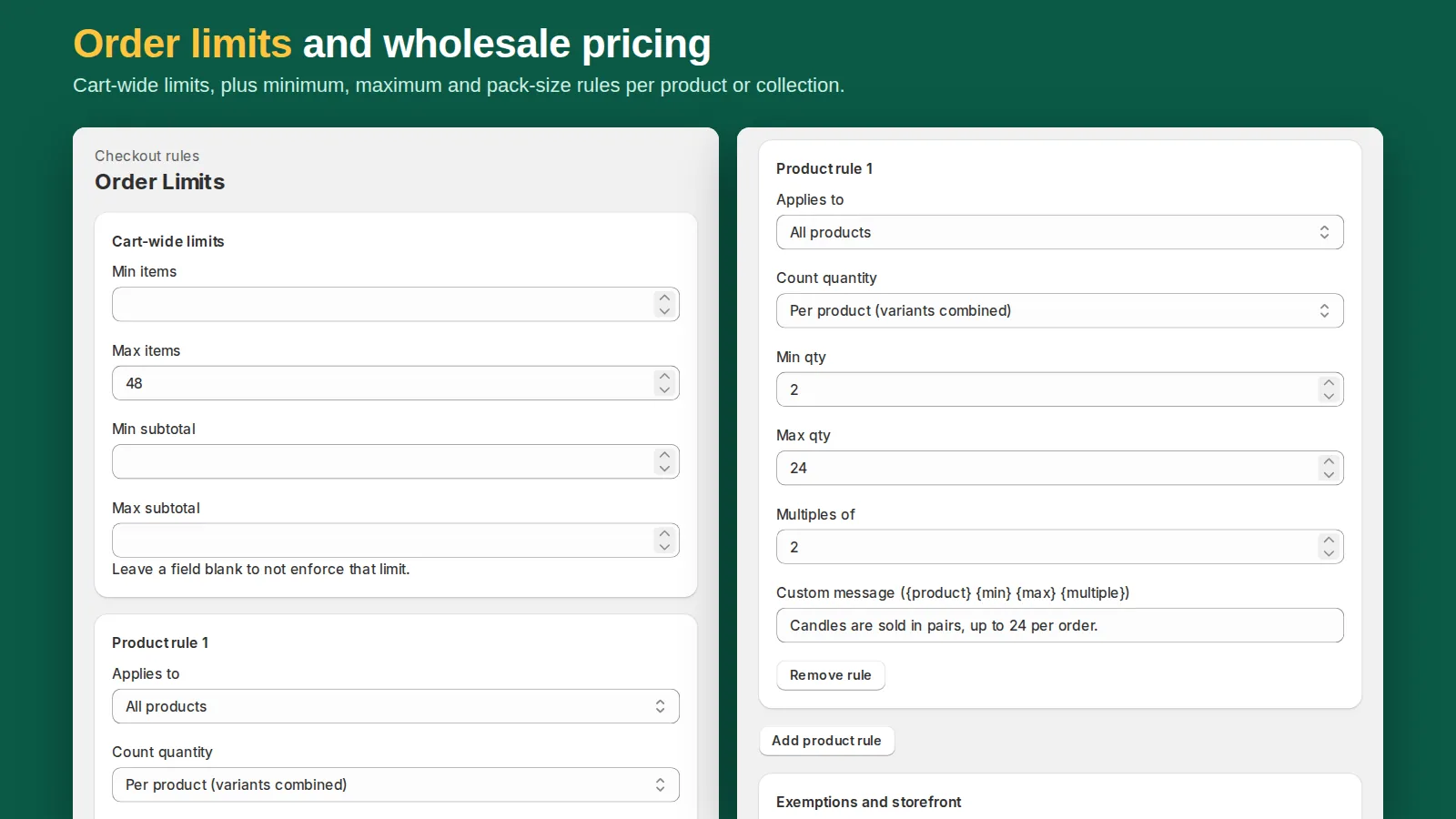
Shopify lets apps add checkout rules (Cart and Checkout Validation Functions). They run inside Shopify and block checkout with your message when the cart breaks a rule, on every checkout path. You'll find the ones you've installed under Settings → Checkout → Checkout rules. This is the dependable way to limit order quantity for retail customers.
When you choose an app for it, check that it:
- uses checkout validation (not theme JavaScript),
- supports per-product, per-collection and whole-cart rules,
- supports multiples as well as min and max,
- lets some customers skip the rules (for example staff or wholesale accounts, by tag),
- lets you write the message customers see.
Our app Tierwise includes order limits on its Pro plan: minimum, maximum and multiple-of rules for products, collections and the whole cart, with exempt customer tags and your own message, as a checkout rule. It's the same app that adds quantity-break discounts, which is handy when "buy in cases of 6" and "save 10% on 12" apply to the same products.
Examples
- Launch limit: maximum 2 per product on the launch collection, exempt tag "vip".
- Case packs: multiples of 12 on the wholesale collection, minimum 12.
- Sample sizes: maximum 3 in the cart for products tagged "sample".
Tell customers before checkout
A rule that only shows up at checkout feels like a bug to customers. Add a line to the product description ("Sold in cases of 12"), and make the checkout message say what to change ("Add 4 more to make a full case").
Want the opposite, rewarding bigger orders instead of limiting them? See how to set up quantity breaks in Shopify.