Shopify quantity discounts without Shopify Plus
Run tiered quantity discounts on any Shopify plan: automatic discounts with a minimum quantity, what's really Plus-only, the limits, and a one-discount alternative.
October 11, 2026 · 5 min read
Disclosure: we make Tierwise, the app mentioned near the end. The native steps work without it.
A lot of quantity-discount advice starts with "on Shopify Plus, use Scripts" or "use B2B price lists". You don't need Plus for quantity discounts. Every Shopify plan can run "buy 3, save 5%; buy 6, save 10%" with the discounts that are already in your admin. Here's how, what it can't do, and where an app helps.
What every plan can do: automatic discounts with a minimum quantity
Shopify's Amount off products discount has a minimum purchase requirement called Minimum quantity of items. Set it to 3 and the discount only applies once the cart holds 3 eligible items. That's one tier. Build a second discount for the next tier.
- Go to Discounts → Create discount → Amount off products.
- Pick Automatic discount and give it a title shoppers will see at checkout, such as "Buy 3, save 5%".
- Enter the value (5%) and choose the products or collections it applies to.
- Under Minimum purchase requirements choose Minimum quantity of items and type 3.
- Leave the combinations unticked for the other tiers, set the start date and save.
- Repeat for each tier: "Buy 6, save 10%" with a minimum of 6, and so on.
- Add 6 items to a test cart and check that only the 10% tier applies.
When two of your tiers qualify and they aren't set to combine, Shopify applies the one that saves the customer the most, so the bigger tier takes over as the cart grows. No Plus, no code.
What Plus-only features people mean
- Shopify Scripts were the old Plus-only way to write custom discount logic. Shopify is replacing them with Shopify Functions, which apps can use on any plan. That's why quantity-break apps now work on Basic.
- B2B price lists with volume pricing are built for company accounts. Which B2B features you get depends on your plan, and they only apply to B2B buyers, not your normal storefront. See our wholesale pricing guide.
- Checkout customisation (extra blocks in the checkout itself) is mostly Plus. Quantity discounts don't need it: the discount appears as a line at checkout on every plan.
The limits of the native method
- Shoppers can't see the tiers before checkout. Nothing on the product page says "buy 6, save 10%" unless you add it to the description or theme by hand.
- No "add 2 more" nudge in the cart, which is where quantity discounts actually change behaviour.
- Mix and match only. The minimum counts eligible items across the cart, so 6 different products reach the 6-item tier. "6 of the same product" isn't an option.
- One discount per tier, and Shopify caps how many automatic discounts can be active at once.
- No fixed unit prices. "$4.50 each from 10" has to be worked out as a percentage or amount off.
For a few tiers on one collection, the native method is fine. Put a small table in the product description (our quantity discount table guide has three ways) and you're done.
The faster way: one discount with all the tiers
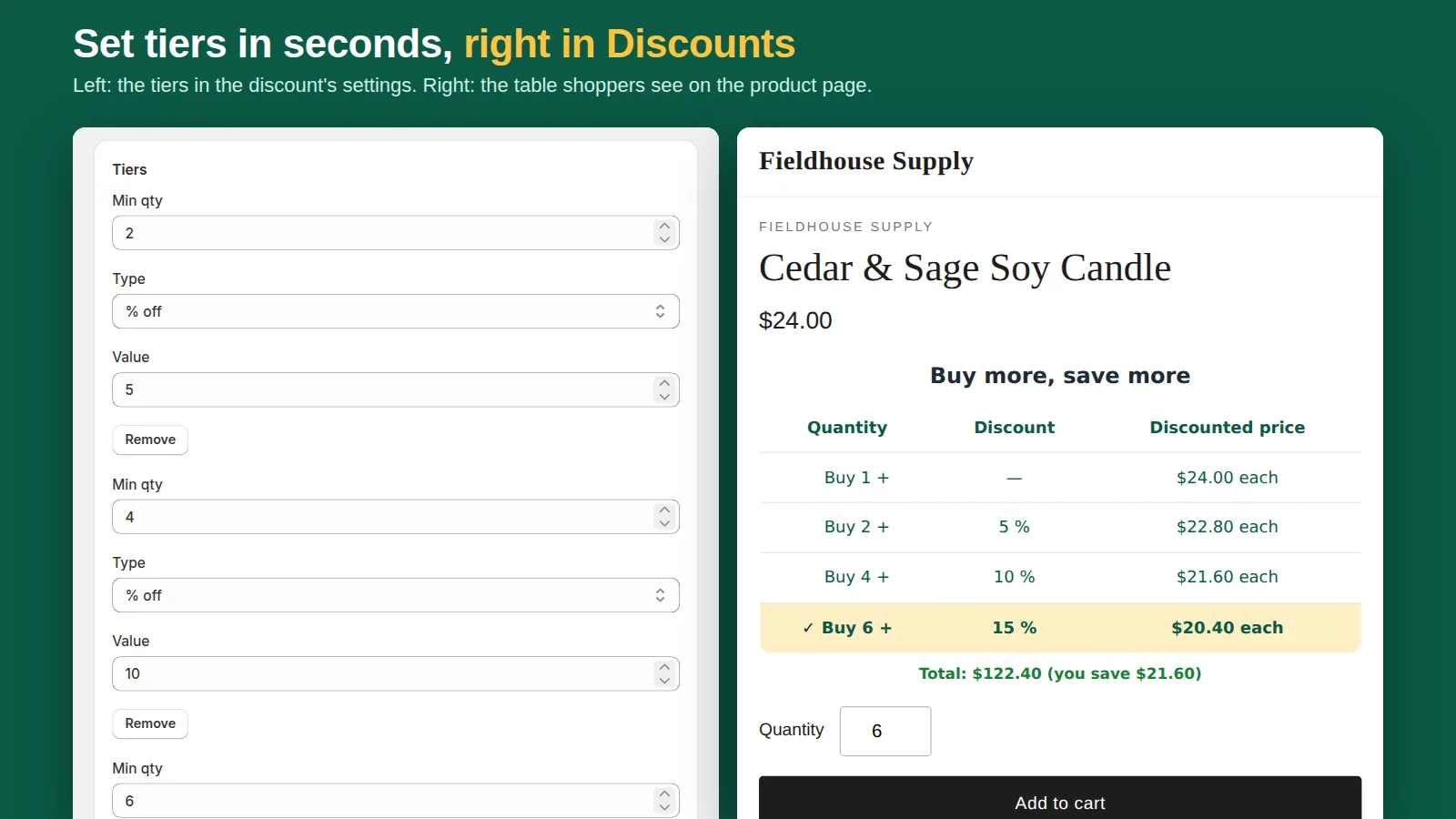
Tierwise is a Shopify Functions discount, so it works on every plan, including Basic. One discount holds every tier, and each tier can be a percentage, an amount off each unit or a set unit price. You choose whether the quantity counts across products, per product or per variant. It adds a tier table to the product page, an "add 2 more to save 10%" message in the cart, and "Up to 10% off" badges on collection pages. The discount applies at checkout, Buy It Now and express checkout included.
Quantity breaks are free with no cap on campaigns or orders. Wholesale tiers by customer tag and order limits are in Pro ($9.99/month with a 14-day free trial).
Before you launch
- Check your margins at the deepest tier, after payment fees and shipping.
- Decide how quantity discounts interact with your discount codes, then set the combinations to match.
- Test on mobile: most shoppers will see the tiers on a phone.
Related: how to set up quantity breaks, volume discount not working? and free quantity break apps compared.
Frequently asked questions
Do I need Shopify Plus for quantity discounts?
No. Every plan can create automatic Amount off products discounts with a minimum quantity of items, one per tier. Apps built on Shopify Functions also work on every plan.
Can Shopify discount by quantity of the same product?
Not natively. The minimum quantity counts all eligible items in the cart, so different products add up. Per-product or per-variant counting needs an app.
Will the higher tier replace the lower one?
Yes, if the tier discounts aren't set to combine. Shopify applies the one that gives the customer the biggest saving.