
Shopify app
Tierwise: Quantity Breaks
Quantity breaks, volume and wholesale pricing that apply at checkout, plus min/max order limits.
Install from the Shopify App Store
What it does
Reward bigger orders with tiered quantity discounts that Shopify applies itself at checkout, including Buy It Now and every checkout path. Set percentage off, an amount off each unit, or a fixed unit price, and discount in packs. Show a live tier table on product pages, "add 2 more to save 10%" in the cart, and "Up to 15% off" badges on collection pages. Give wholesale customers their own tiers by customer tag and set minimum, maximum and multiple order limits. No scripts in your theme code.
Built on Shopify Functions
The discount runs inside Shopify's own checkout, so it holds on Buy It Now, express checkout and every other checkout path. No scripts are added to your theme code.
Show the savings where shoppers decide
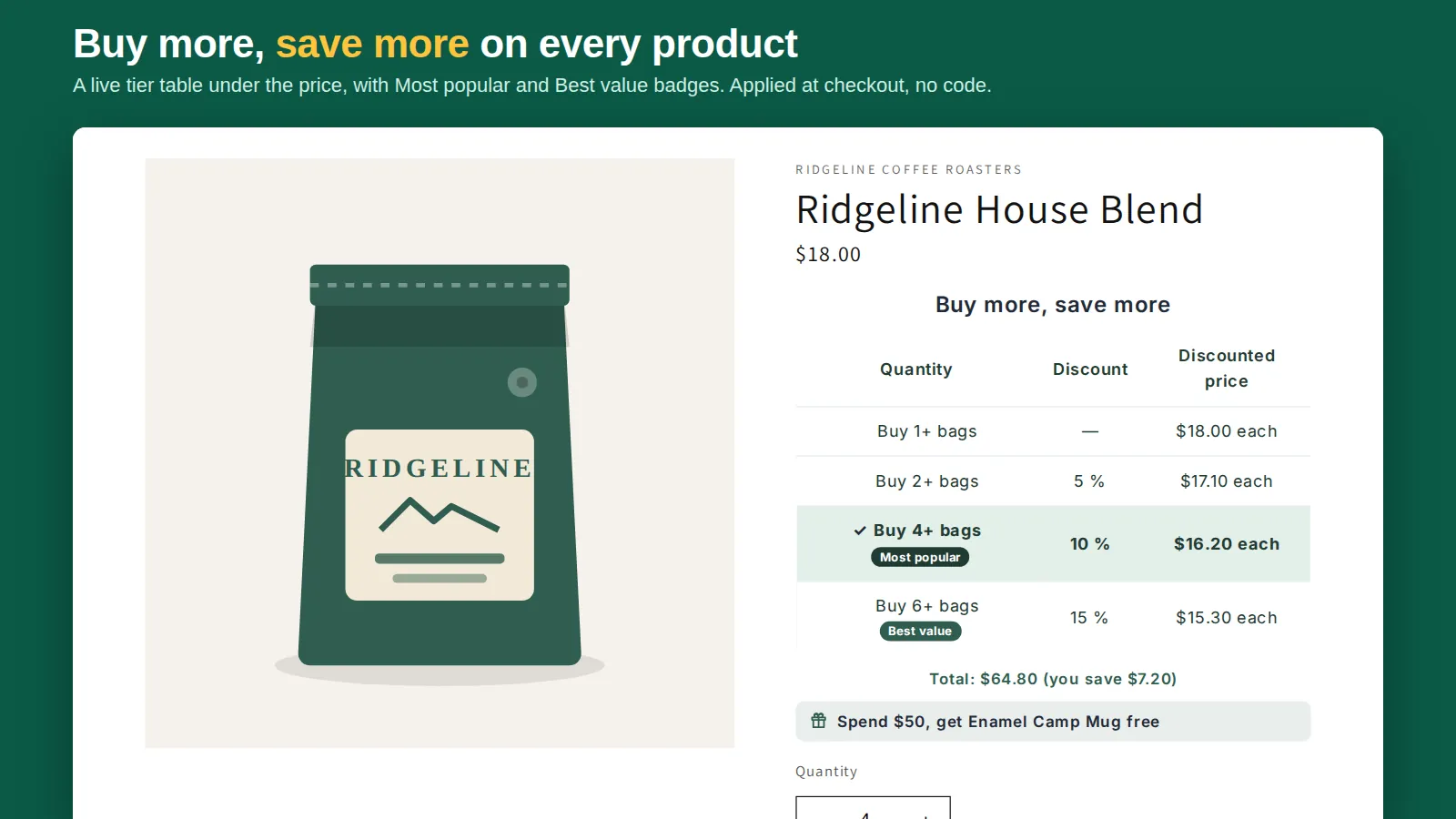
A tier table, bundle cards or compact buttons under the price (tap a tier to set the quantity), "add 2 more to save 10%" with a progress bar in the cart, and "Up to 15% off" badges on collection pages.
Wholesale and order limits
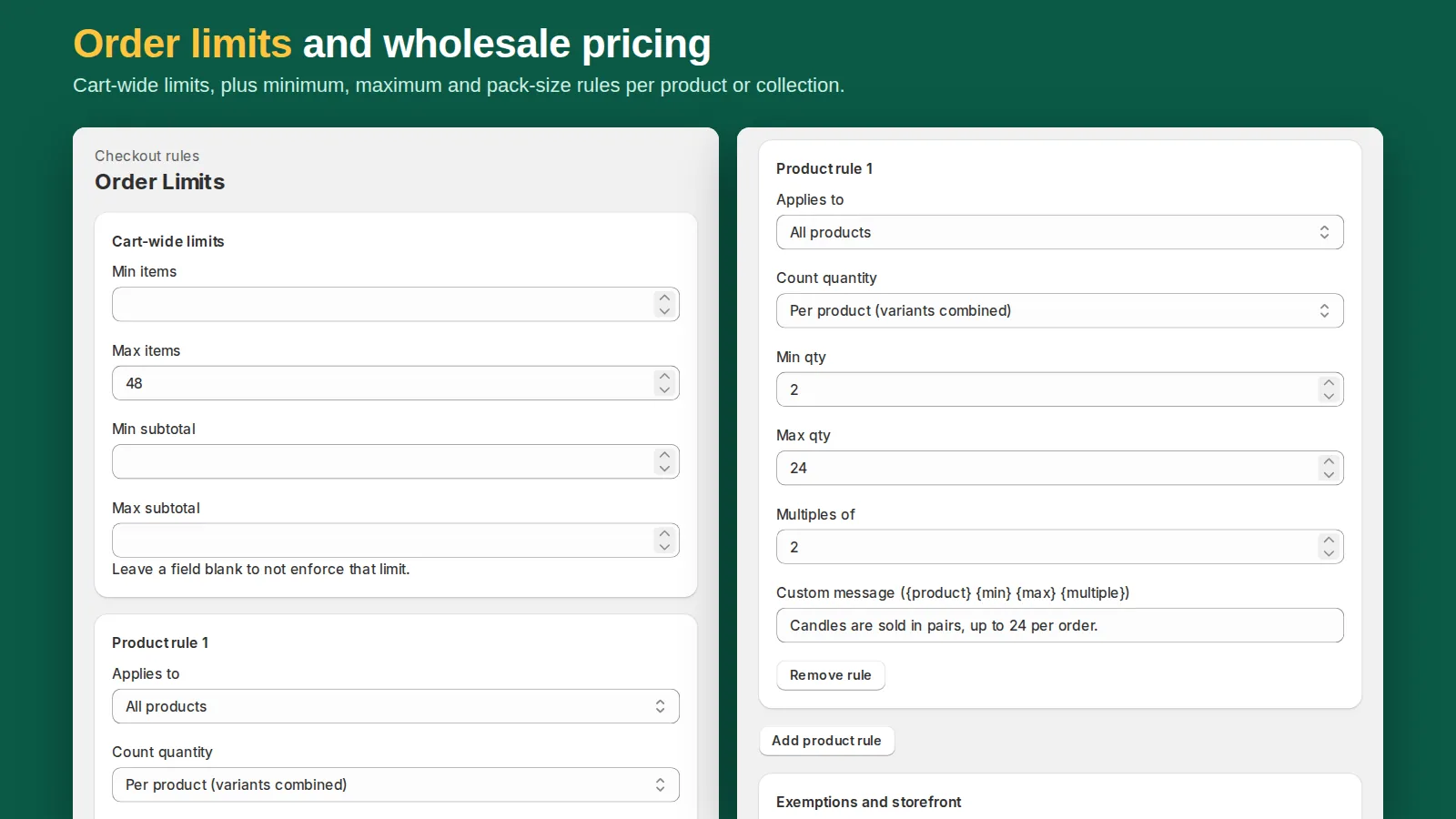
Give customers tagged wholesale their own tiers, and set minimum, maximum and multiple-of quantities per product, collection or cart. Checkout blocks orders that break a rule, with your message.
Five kinds of deal
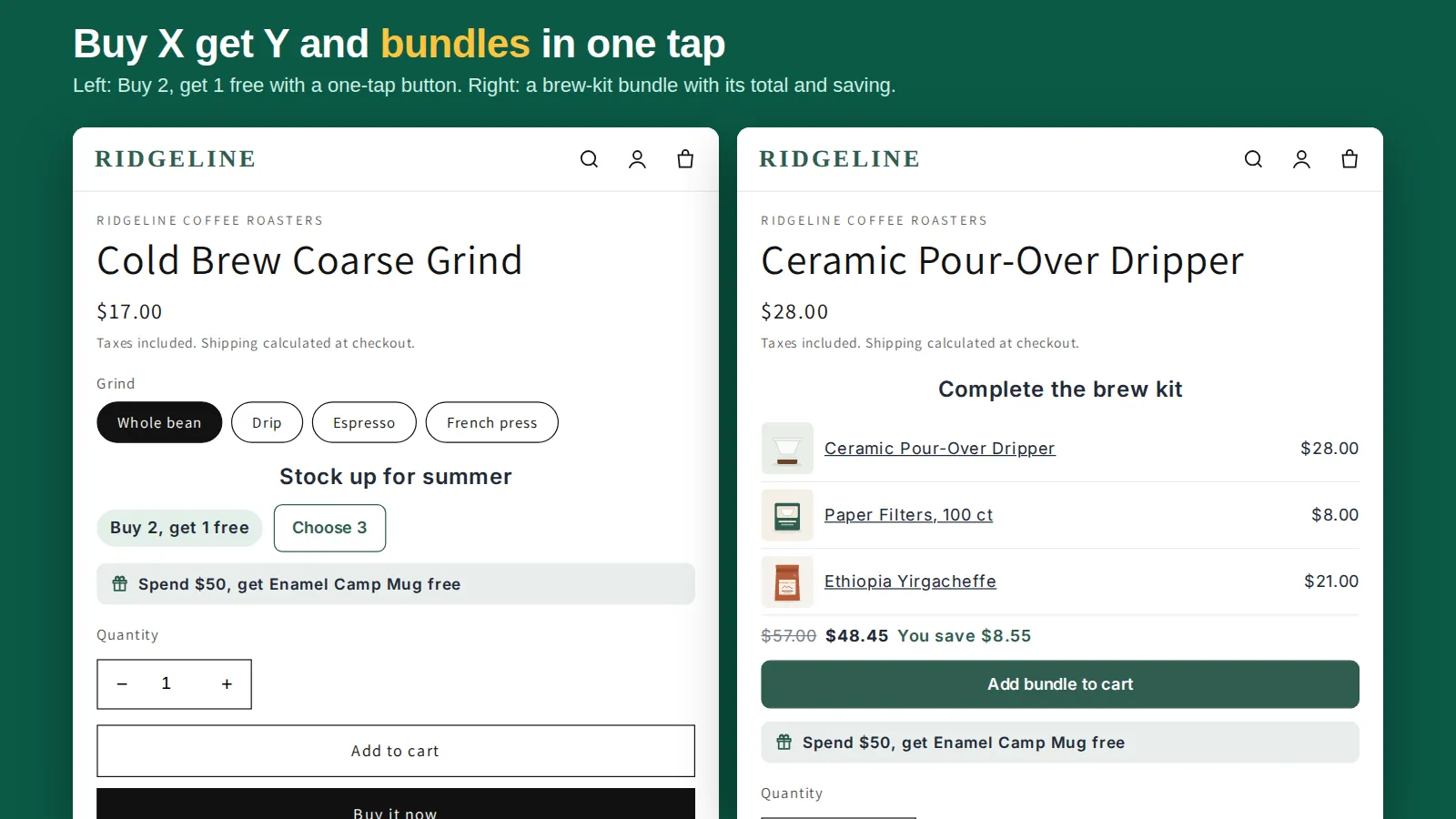
Quantity break tiers, discounts in packs, Buy X get Y (buy 2, get 1 free or 50% off), mix-and-match bundles with a fixed bundle price, and a free gift once an order reaches a spend or item minimum. Each one is an automatic Shopify discount, so nobody types a code.
Savings in the cart drawer
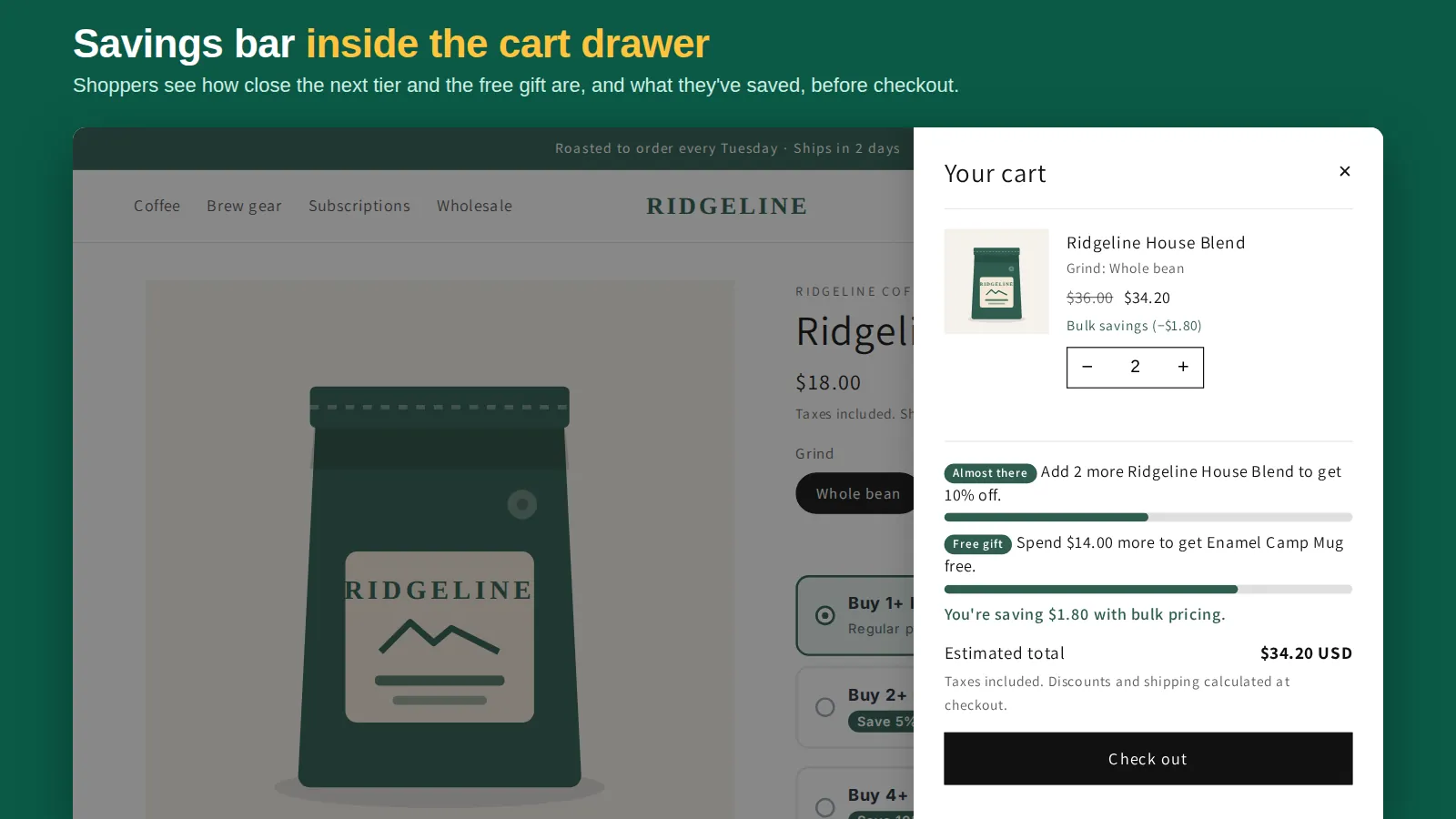
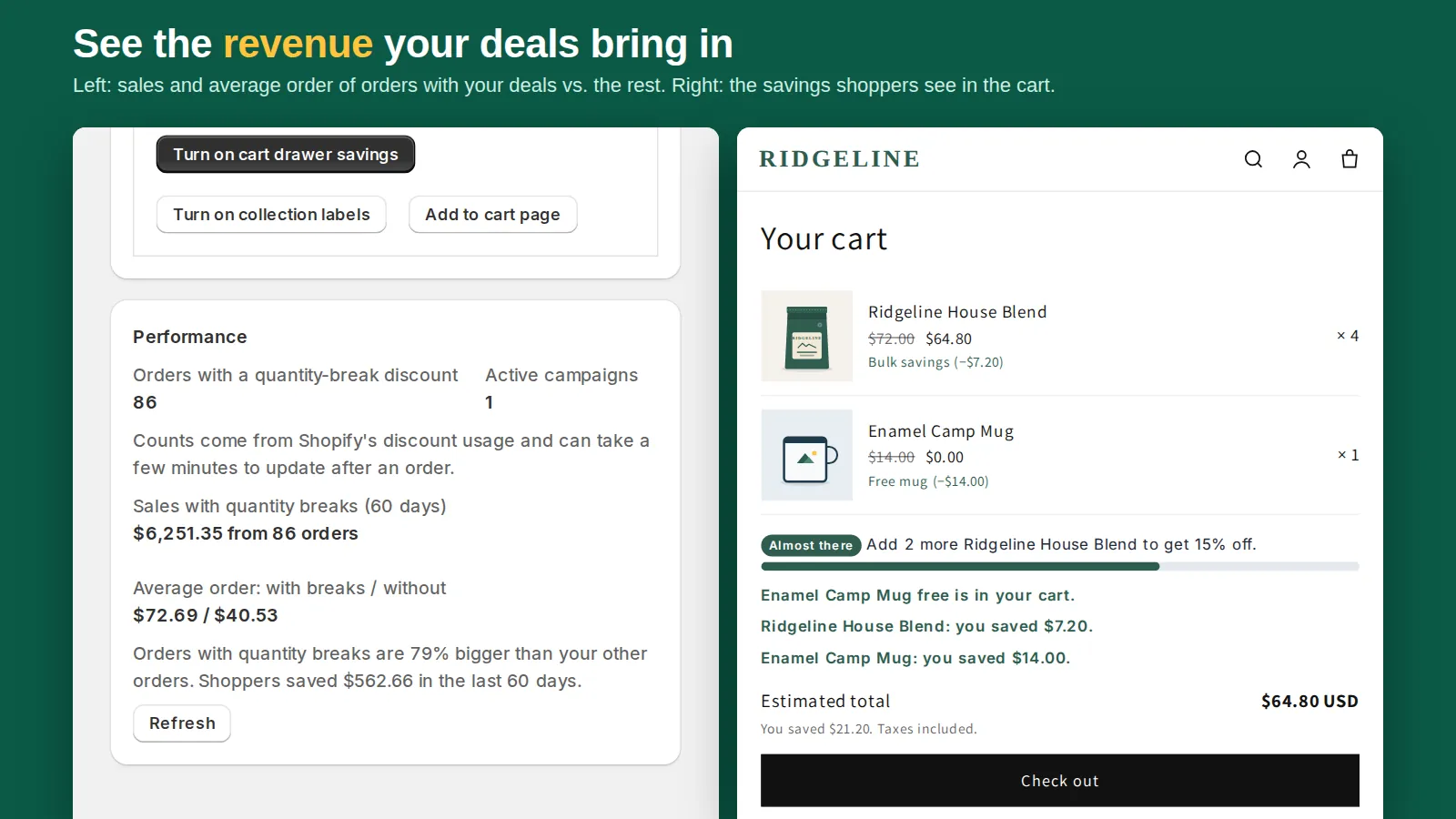
The Cart Drawer Savings embed shows the next tier, free-gift progress and the amount saved inside your slide-out cart, with a progress bar. Product pages get Most popular and Best value badges and an optional, honest urgency line.
Speaks your shoppers' language
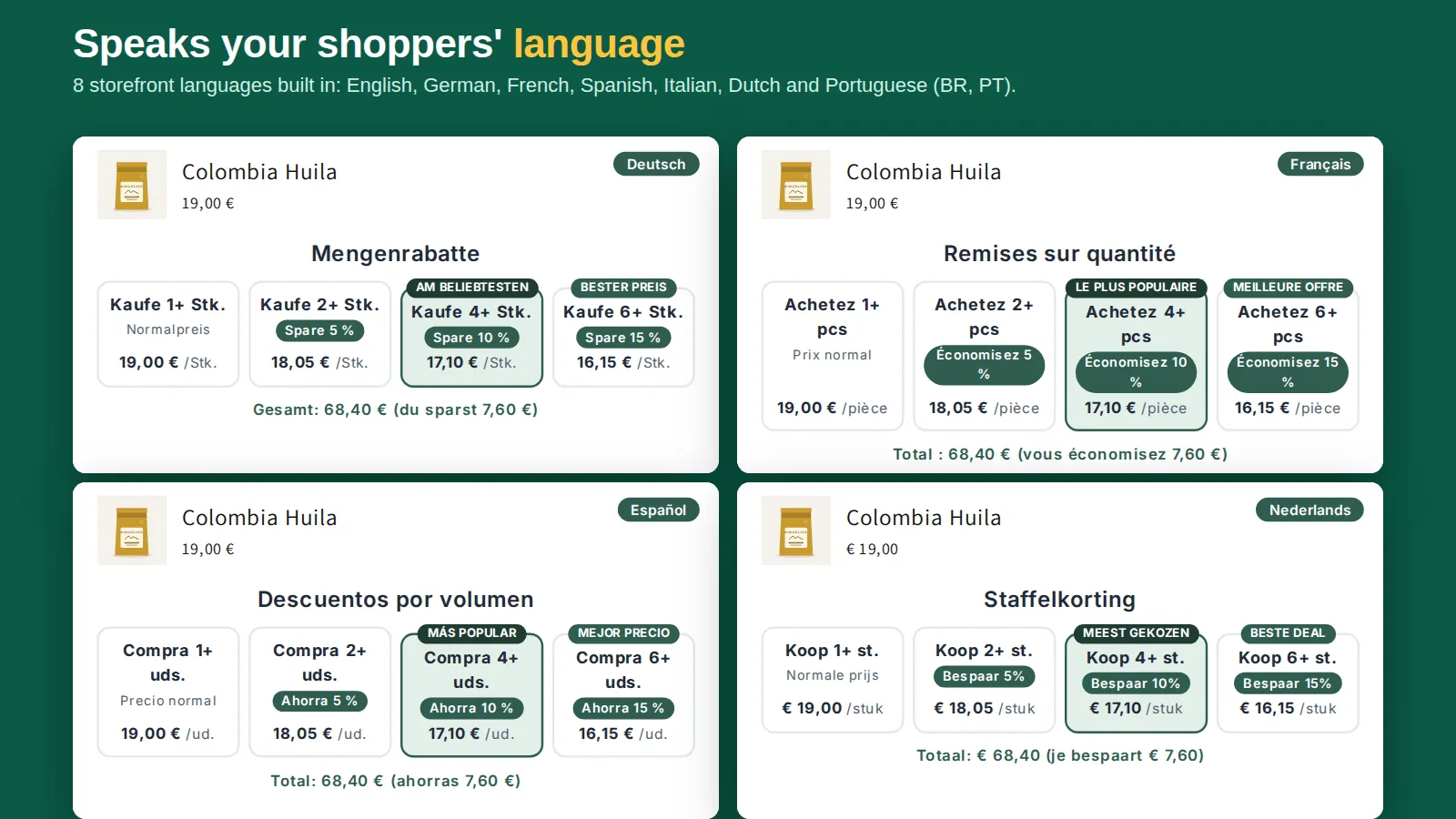
Every storefront label ships in English, Spanish, French, German, Italian, Dutch and Portuguese (Brazil and Portugal), following the shopper's language unless you type your own wording. The app admin follows your Shopify admin language in six of them.
Three steps to set up
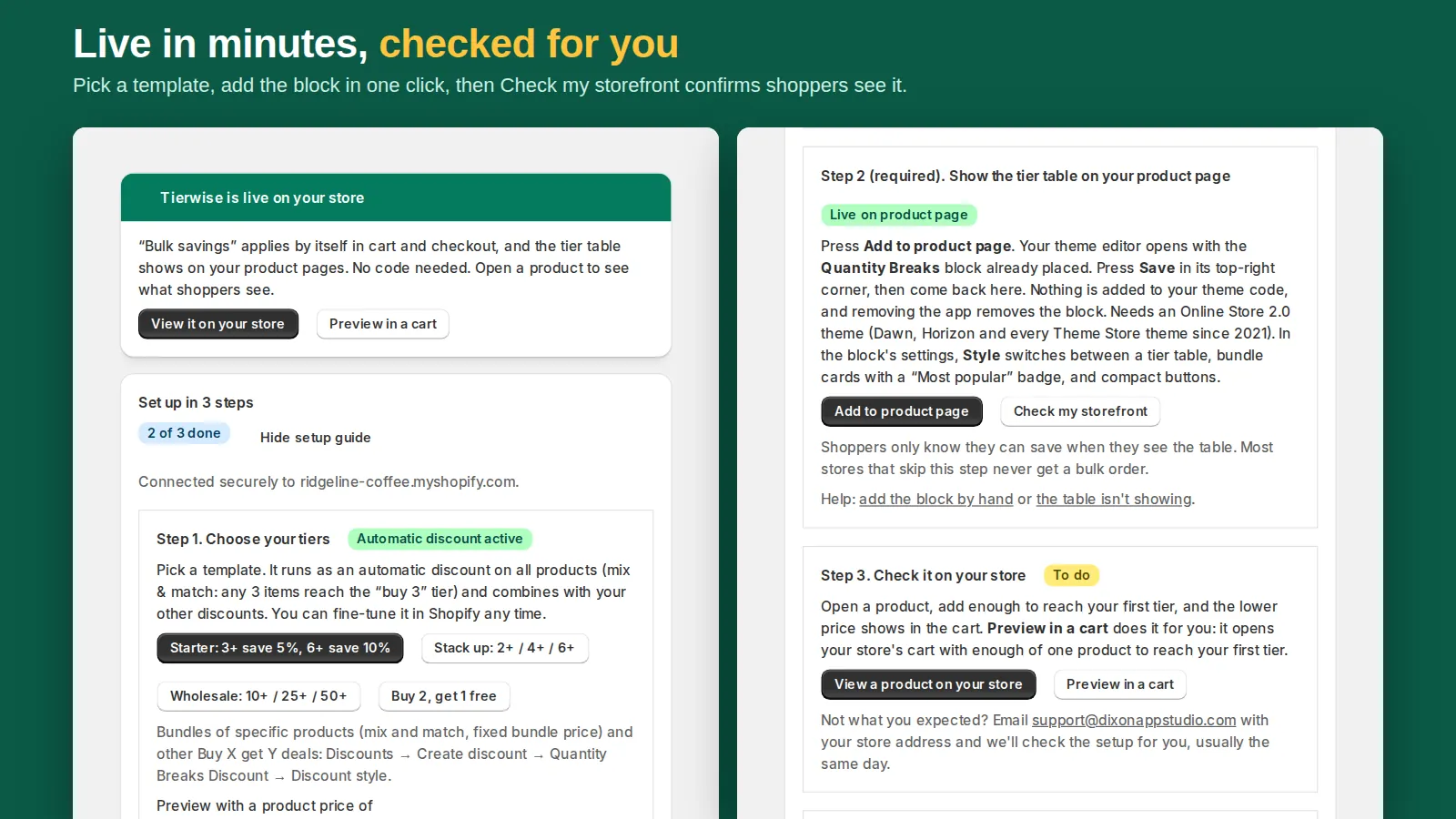
Create the discount in Shopify's Discounts page, add the tier-table block from the theme editor with one click, then optionally turn on collection labels and the cart block. Needs an Online Store 2.0 theme.
How it works
Create the quantity-break discount
Press "Create ready-made discount" on the app home for buy 3 save 5% and buy 6 save 10% on all products, or build your own tiers in Discounts: a percentage, an amount off each unit or a fixed unit price, for all products, chosen products or collections.
Add the tier table to product pages
"Add to product page" opens your theme editor with the Quantity Breaks block already placed in the product section. Press Save and the table shows on every product the discount covers.
Turn on cart savings and collection badges
Optional: one click adds "Add 2 more to save 10%" to the cart and "Up to 10% off" badges to collection pages. The app home shows a live status badge for each step.
Shopify applies the discount at checkout
The tiers run as a Shopify Functions discount, so the price drop holds in the cart, checkout, Buy It Now and express checkout. Results show in Shopify's own discount reports.
Features
- Tiered discounts as a percentage, an amount off each unit, or a set unit price
- Discounts apply at checkout, including Buy It Now and express checkout
- Tier table on product pages that sets the quantity with one click
- Cart messages that show how many more items unlock the next tier
- Wholesale tiers by customer tag, plus minimum, maximum and pack-size limits
- Buy X get Y deals such as buy 2, get 1 free, applied automatically
- Mix-and-match bundles with a percentage, amount or fixed bundle price
- Free gift with purchase after a minimum spend or number of items
- Cart drawer savings bar: next tier, free gift progress and amount saved
- Storefront text in 8 languages: EN, ES, FR, DE, IT, NL, PT-BR and PT-PT
Screenshots
Pricing
Free
$0
Free forever
1 active quantity-break campaign, all storefront widgets (three tier styles, cart progress bar, collection badges), discount reports
Pro
$9.99/month or $99/year
14-day free trial
Everything in Free, plus unlimited quantity-break campaigns, wholesale pricing by customer tag and order limits (product, collection, cart min/max/multiples, exempt tags)
Prices in USD, billed through Shopify.
Video tutorials


Guides
- How to add quantity breaks to Shopify (step by step, with video)
- Shopify tiered pricing: 4 ways to set it up, compared
- Buy 2 get 1 free on Shopify: set up an automatic BOGO discount
- Shopify bundle discount: 3 ways to set it up (and which to use)
- Shopify free gift with purchase: set it up so shoppers actually claim it
- Shopify quantity discounts without Shopify Plus
- Shopify volume discount not working? 7 things to check
- How to show a quantity discount table on Shopify product pages
- Tierwise vs Kaching vs Pumper vs Dealeasy: quantity break apps compared (2026)
- Free quantity break apps for Shopify: what each free plan really includes
- Quantity breaks vs. bundles on Shopify: which offer does your store need?
- How to sell in packs or multiples on Shopify
- How to limit order quantity in Shopify (min, max and multiples)
- Shopify wholesale pricing: 4 ways to set it up
- Buy more, save more on Shopify: tiers that work and how to show them
FAQ
Does the discount apply at checkout, or only on the product page?
At checkout. Tierwise is a Shopify Functions discount, so Shopify itself applies it in the cart and checkout, including Buy It Now and express checkout. The product-page table only shows the tiers.
What kinds of tiers can I set?
A percentage off, an amount off each unit, or a fixed unit price per tier, and you can discount in packs. You choose which products or collections each discount covers.
Can wholesale customers get different prices?
Yes, on the Pro plan. Wholesale tiers apply to customers with a tag you choose, evaluated inside Shopify's checkout.
Can I set minimum or maximum order quantities?
Yes, on the Pro plan. Order limits cover minimum, maximum and multiple-of quantities per product, per collection or for the whole cart, with exempt customer tags. Checkout blocks an order that breaks a rule and shows your message.
Does it edit my theme code?
No. The tier table and cart messages are theme app blocks and the collection labels are an app embed; nothing is written into theme code, and uninstalling removes them. It needs an Online Store 2.0 theme.
How much does it cost?
Free covers 1 active quantity-break campaign, all storefront widgets and discount reports. Pro is $9.99/month or $99/year with a 14-day trial and adds unlimited campaigns, wholesale pricing by customer tag and order limits.
Is the free plan capped by orders or revenue?
No. The free plan has no order or revenue cap: one quantity-break campaign (covering all products, chosen products or collections) runs with every storefront widget. Pro adds unlimited campaigns, wholesale pricing by customer tag and order limits.
Can it do buy 2, get 1 free, bundles or a free gift?
Yes. Discount style offers quantity-break tiers, discounts in packs, Buy X get Y (the cheapest items are discounted), mix-and-match bundles with a percentage, amount or fixed bundle price, and a free gift once an order reaches a spend or item minimum. All of them run as automatic discounts.
Can the tier table look like bundle cards?
Yes. The Quantity Breaks block has three styles: a tier table, bundle cards (one tappable card per tier with its saving and an optional Most popular badge) and compact buttons. Every style sets the quantity when a shopper taps a tier, and every label can be translated.
Is it on the Shopify App Store yet?
Yes. Tierwise is published on the Shopify App Store at https://apps.shopify.com/bulk-tier-pricing-public. Install it from there; there is a free plan.
Get Tierwise
Reward bigger orders with quantity discounts at checkout.
Install from the Shopify App StoreHelp: support@dixonappstudio.com · App guide · App privacy policy
More Shopify apps from us

Bulk Edit Everything
Bulk edit products, variants, prices, SEO, customers and orders, with preview, scheduling and undo.
Shelfport: Collection Import
Export and import collections by spreadsheet, with smart rules, product order, preview and undo.

Spanwise: Coverage Calculator
Shoppers enter room or yard size, see how many units to buy, and add them to cart in one click.

Cratebird: Reorder & POs
Know what to reorder before you run out, send purchase orders and receive stock into Shopify.

Gaugely: Part Size Finder
Find screws, washers, O-rings and parts by thread, diameter, length and material, in mm or inches.

Quotewell: B2B Quotes
Take B2B quote requests from product pages, price them, and send a Shopify invoice in one click.