

Shopify app
Shelfport: Collection Import
Export and import collections by spreadsheet, with smart rules, product order, preview and undo.
Install from the Shopify App Store40-second demo, no sound. Recorded on a development store with a fictional catalogue.
What it does
Shopify has no spreadsheet import or export for collections. Shelfport adds it. Export every collection with its smart rules, product order, SEO, image, publishing and metafields, as a CSV or a full backup. Edit it in Excel or Google Sheets, or build new collections from a template. Import it back, or into another store, and see every collection that will be created or changed before anything is saved. Then undo the whole import in one click if you change your mind.
The collection CSV Shopify doesn't have
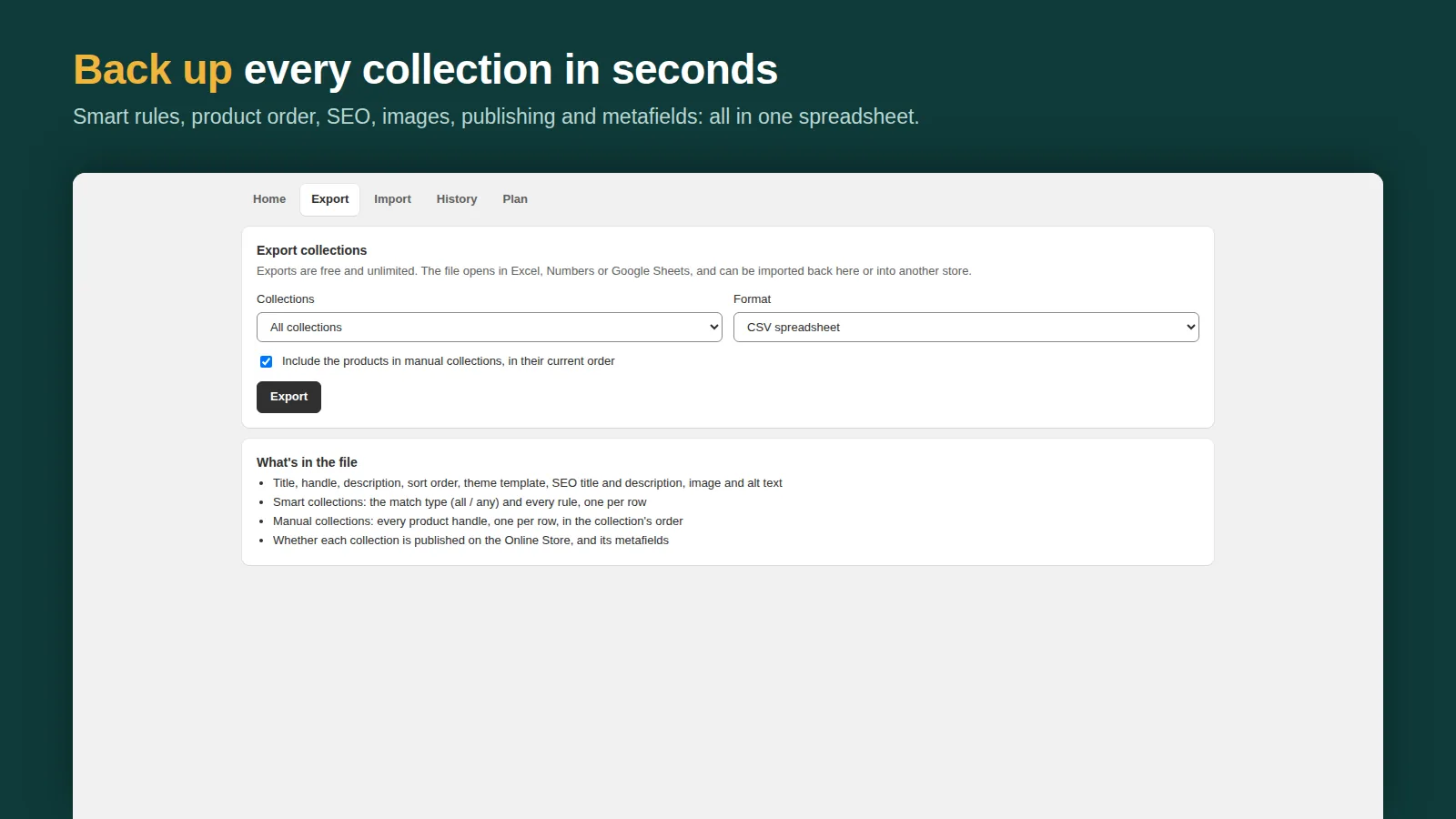
Export every collection with its smart rules, product order, SEO, image, publishing and metafields, as a CSV or a full backup.
Edit in any spreadsheet
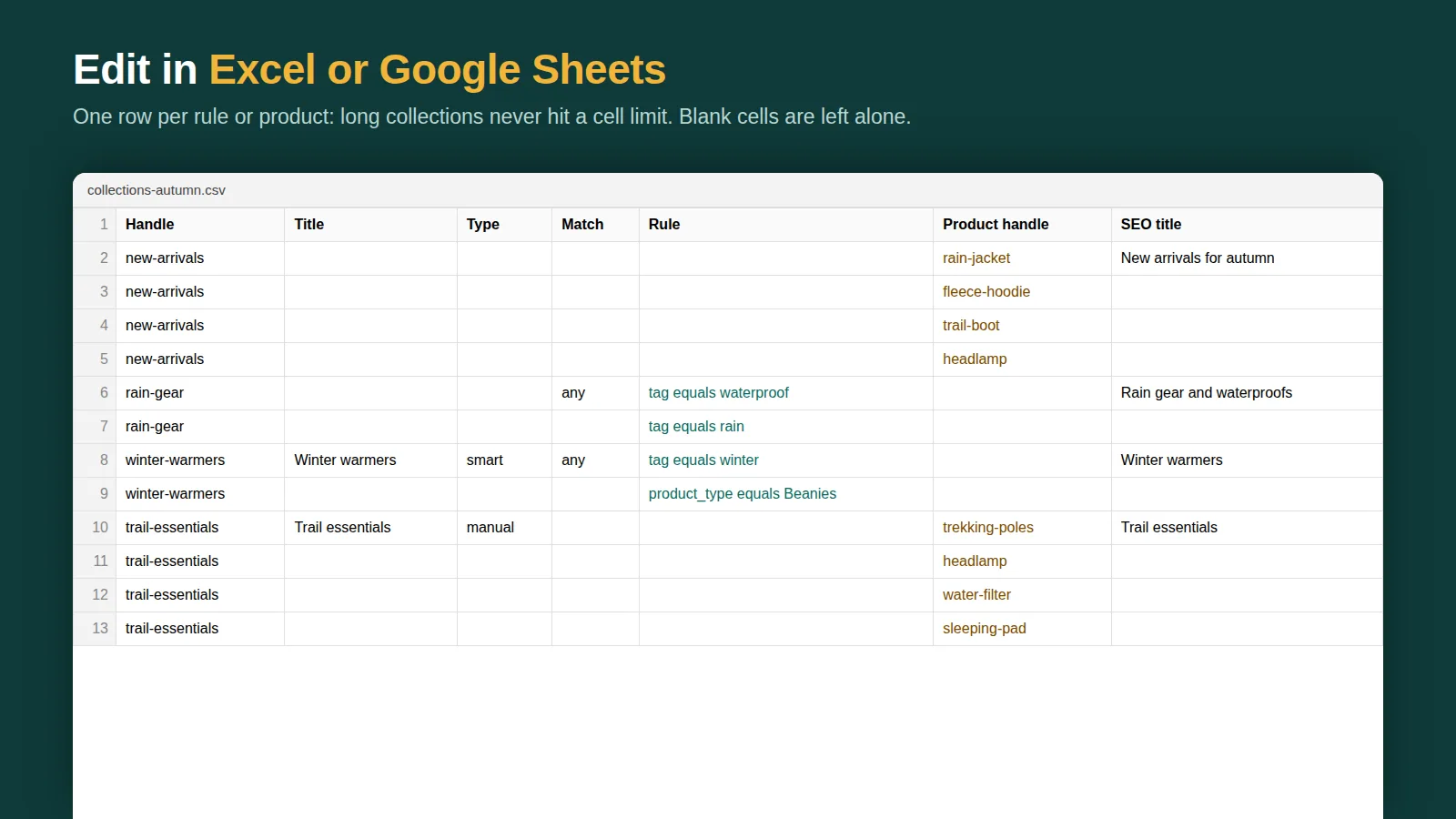
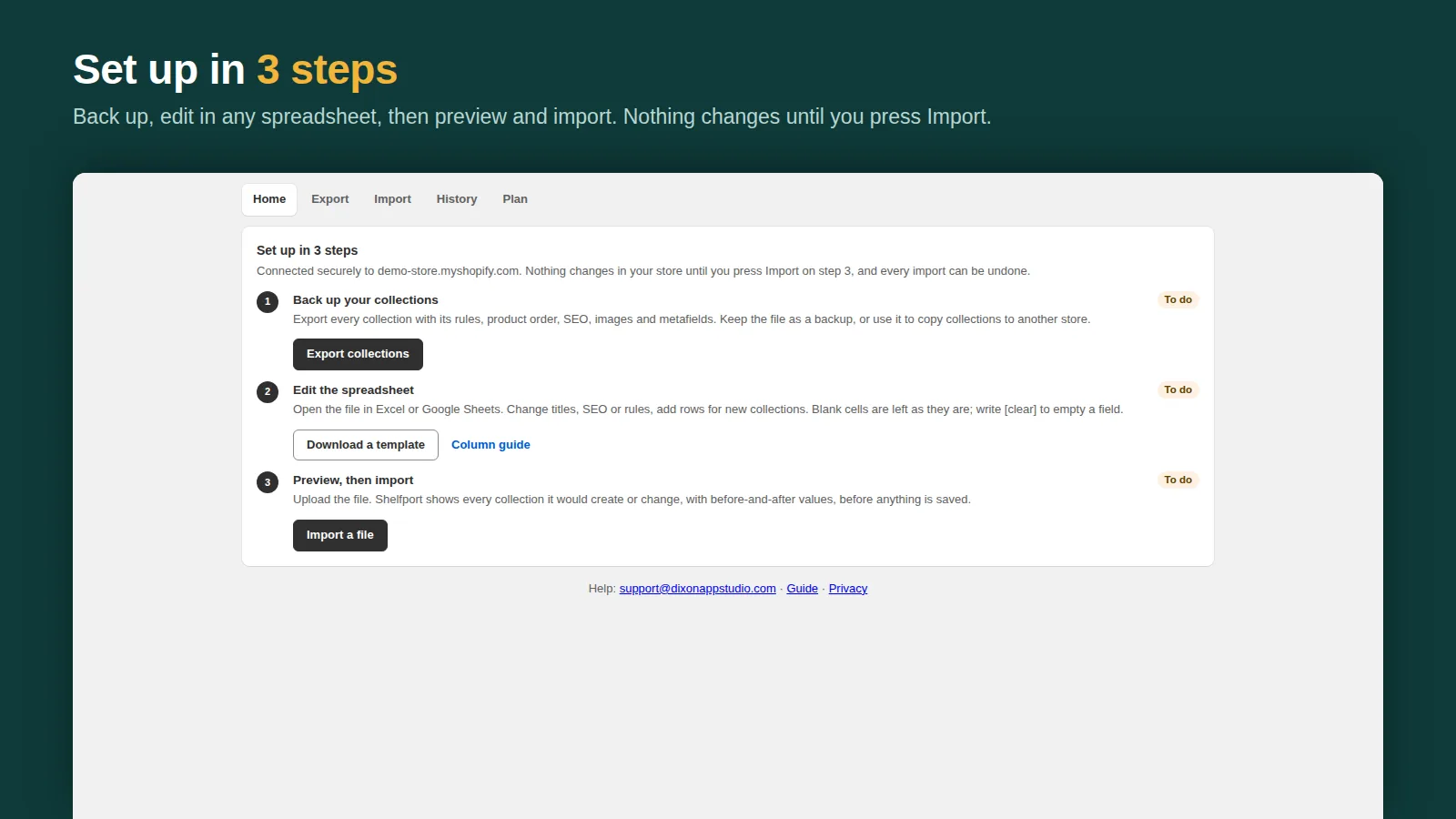
Open the file in Excel or Google Sheets, change titles, SEO or rules, or add rows for new collections. Blank cells are left as they are.
Preview, then import
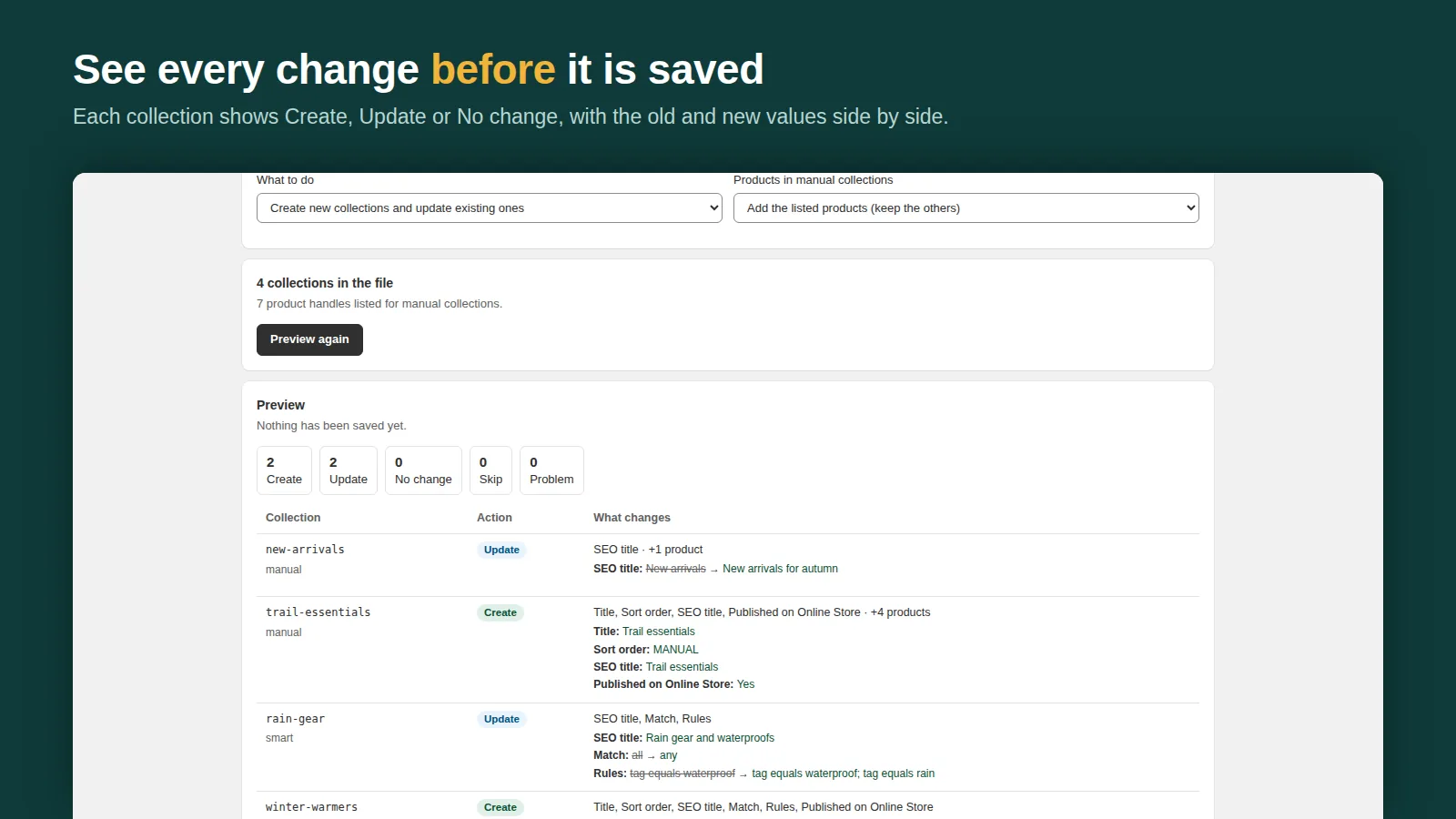
Every collection shows Create, Update or No change with before-and-after values. Nothing is saved until you press Import.
Backups you can restore in two presses
Every full export is kept in the Backups tab, and Pro backs up your collections automatically every day or week. Restore shows the changes first, then puts rules, product order and SEO back.
Copy to another store, undo anything
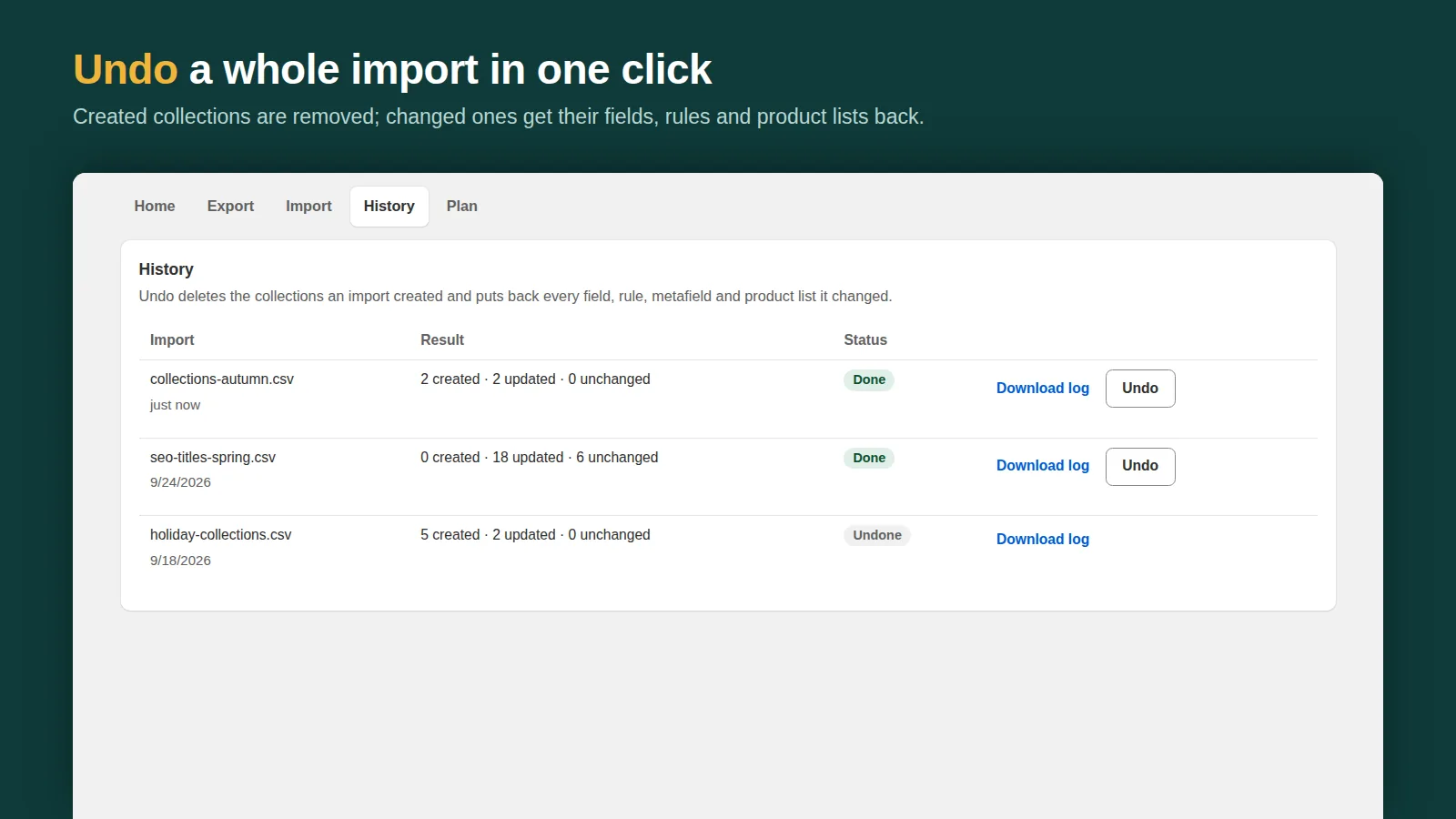
Import the same file into another store with products matched by handle. Undo a whole import in one click: fields, rules and product lists come back.
Features
- Export every collection with its smart rules, product order, SEO and metafields
- Preview every new collection and every change before anything is saved
- Undo a whole import in one click: fields, rules and product lists come back
- Copy collections to another store, with products matched by handle
- Create hundreds of smart collections from one spreadsheet
Screenshots
Pricing
Free
$0
Free forever
Unlimited exports, the 3 newest backups saved in the app, up to 5 collections per import, 7-day undo, templates
Pro
$7.99/month or $79/year
7-day free trial
Unlimited collections per import, automatic daily or weekly backups kept 30 days, 30-day undo, priority email support
Prices in USD, billed through Shopify.
Guides
- How to export collections from Shopify to CSV, and import them back
- How to copy collections to another Shopify store
- How to create Shopify collections in bulk
- How to sort products in a Shopify collection (and change it in bulk)
- Best Shopify collection import and export apps (2026)
- Shopify smart collections: conditions, examples and bulk setup
- How to back up your Shopify store (and what Shopify doesn't save)
- How to restore a deleted collection in Shopify (and back them up)
- Shelfport vs Matrixify for Shopify collections: a Matrixify alternative compared (2026)
FAQ
Can't Shopify export collections already?
Not as a spreadsheet. Shopify's CSV export covers products, customers and orders; there is no CSV import or export for collections, their smart rules or their product order. Shelfport adds it.
What does the export include?
Every collection with its smart rules, product order, SEO, image, publishing and metafields, as a CSV or a full backup. Smart rules and product handles are one per row, so the file is easy to edit.
Can I copy collections from one store to another?
Yes. Export from the first store and import into the second; products are matched by handle, and the preview shows exactly what will be created.
What if an import goes wrong?
Undo it. History → Undo deletes the collections the import created and restores the ones it changed, including fields, rules and product lists. Undo lasts 7 days on Free and 30 days on Pro.
Does it need access to customer data?
No. Shelfport only asks for products and publications access and never reads customers or orders.
How much does it cost?
Free: unlimited exports, the 3 newest backups saved in the app, up to 5 collections per import and 7-day undo. Pro: $7.99/month or $79/year with a 7-day trial, for unlimited collections per import, automatic daily or weekly backups, 30-day undo and priority email support.
Can Shelfport back up my collections automatically?
Yes, on Pro. Turn on daily or weekly backups in the Backups tab and Shelfport saves every collection (rules, product order, SEO, images, metafields) on schedule, kept for 30 days. Every full export is saved there too, on every plan. Restore loads a backup into the import preview, so you see every change before anything is written, and the restore itself can be undone.
How do I get started quickly?
Use a template on the Home screen: shop by price, sale and best sellers, or seasonal and gift collections. Shelfport previews them against your store and only creates the collections you don't have yet, so a new store gets real smart collections in about a minute.
Is it on the Shopify App Store yet?
Yes. Shelfport is published on the Shopify App Store at https://apps.shopify.com/shelfport-collection-import. Install it from there; there is a free plan.
Get Shelfport
Back up, edit and copy your collections with a safe preview.
Install from the Shopify App StoreHelp: support@dixonappstudio.com · App guide · App privacy policy
More Shopify apps from us
Tierwise: Quantity Breaks
Quantity breaks, volume and wholesale pricing that apply at checkout, plus min/max order limits.

Bulk Edit Everything
Bulk edit products, variants, prices, SEO, customers and orders, with preview, scheduling and undo.

Spanwise: Coverage Calculator
Shoppers enter room or yard size, see how many units to buy, and add them to cart in one click.

Cratebird: Reorder & POs
Know what to reorder before you run out, send purchase orders and receive stock into Shopify.

Gaugely: Part Size Finder
Find screws, washers, O-rings and parts by thread, diameter, length and material, in mm or inches.

Quotewell: B2B Quotes
Take B2B quote requests from product pages, price them, and send a Shopify invoice in one click.