Shopify bundle discount: 3 ways to set it up (and which to use)
Set up a bundle discount on Shopify: Shopify Bundles, a native mix-and-match discount, or a fixed bundle price shown on every product page. Steps and trade-offs.
October 24, 2026 · 6 min read
A bundle discount rewards shoppers for buying products together: the dripper, the filters and a bag of coffee for 15% less than buying them one by one. On Shopify you can build a bundle as its own product, as a discount on a combination, or as "any 3 from this collection". Each route suits a different kind of store. Here's how to set up each one and what shoppers actually see.
First, decide which kind of bundle you mean
- Fixed bundle: specific products together (a starter kit). One price for the set.
- Mix and match: any N items from a collection ("any 3 candles for $45").
- Volume bundle: more of the same product ("3-pack, 6-pack"). That's really a quantity break; see quantity breaks vs bundles.
Option 1: Shopify Bundles (a bundle product)
Shopify's free Shopify Bundles app creates a new product made of components, with its own price. Shoppers buy the bundle as one item, and inventory is taken from the components. It is good for a kit you sell all year with its own photos and page. The trade-offs: the bundle is a separate product (its own listing, SEO and reviews), the components' own pages don't show the bundle unless you link it, and it doesn't cover "any 3 from this collection".
Option 2: a native discount on the combination
For mix and match, an automatic discount does the job without an app:
- Put the eligible products in one collection.
- Discounts → Create discount → Amount off products → Automatic.
- Set the value (for example 15%), apply it to that collection, and set Minimum quantity of items to 3.
- Save and test: 2 items get nothing, 3 items from the collection get 15% off.
This counts any 3 items from the collection, not one of each specific product, and a fixed bundle price ("any 3 for $45") has to be converted into a percentage that only works when the items cost the same. Shoppers also can't see the offer on the product page or know they're one item short in the cart.
Option 3: a bundle that shows on every product in it (Tierwise)
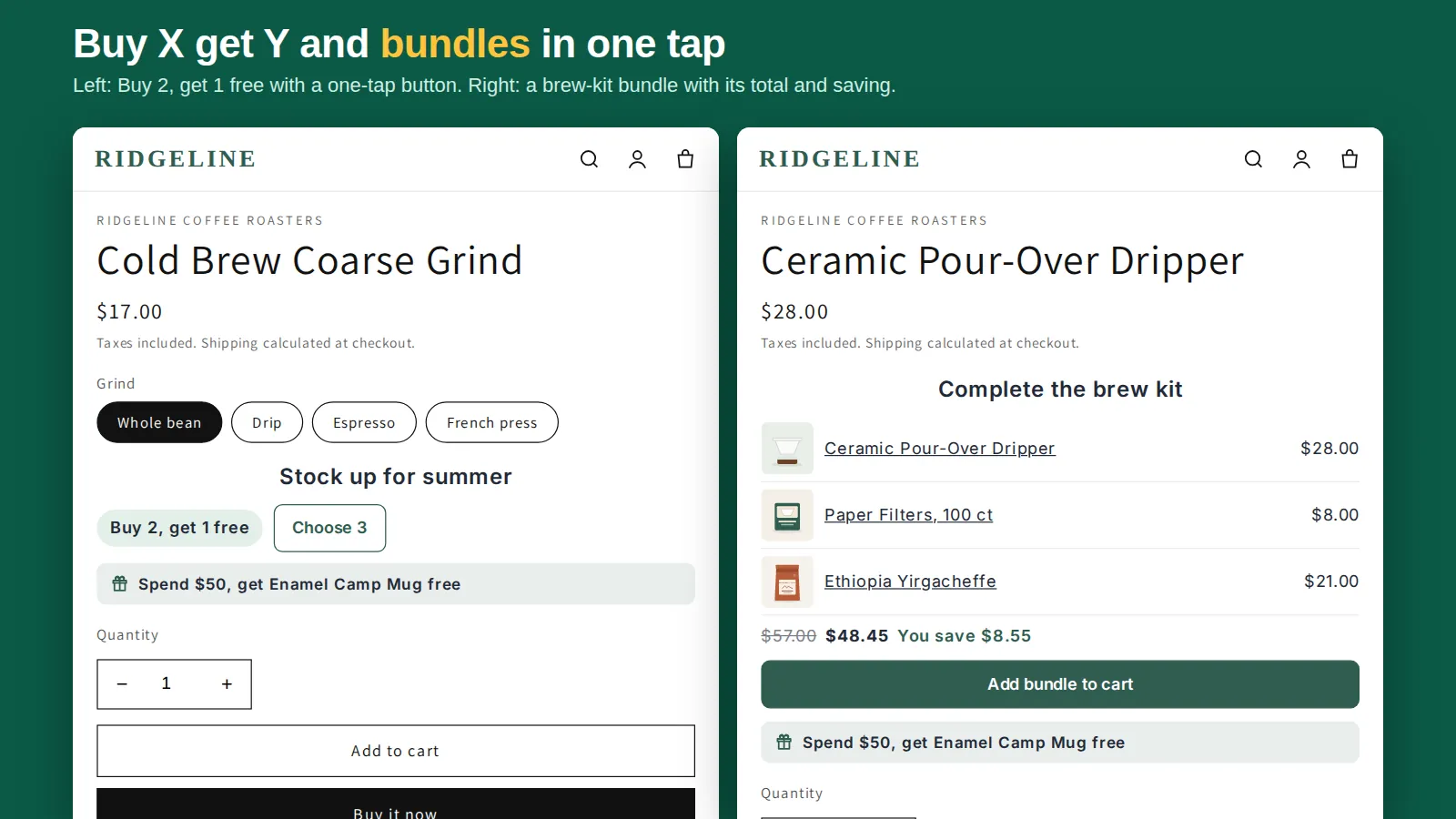
Tierwise has a Bundle discount style built on Shopify Functions:
- In Discounts, create a Quantity Breaks Discount and set Discount style to Bundle.
- Pick 2 or more products and how many of each (for example 1 dripper, 1 pack of filters, 1 bag of coffee).
- Choose the reward per complete set: a percentage off, an amount off, or a fixed bundle price.
- Add the Quantity Breaks block to your product template (one click from the app home, then Save).
Every product in the bundle then lists the whole set on its page with the bundle total, the saving and an Add bundle to cart button, so the bundle sells from all three product pages, not one hidden bundle page. Shopify applies the discount for each complete set in the cart and checkout. On the Free plan you can run one campaign of any style; Pro runs as many as you like.
Which one should you use?
| You want | Use |
|---|---|
| A permanent kit with its own page and photos | Shopify Bundles |
| "Any 3 from this collection" with a percentage off | Native automatic discount, or Tierwise tiers with mix and match |
| A fixed set at a fixed price, shown on each product's page | Tierwise Bundle style |
| More of the same product | Quantity breaks |
Bundle pricing that works
- 10–20% off the set is enough for most bundles; the convenience does part of the selling.
- Round bundle prices ($45, not $44.37) read as a deal.
- Lead with the item people already want and add the accessories to it, not the other way round.
- Watch stock on the cheapest component: a bundle that's half out of stock frustrates shoppers.
Related: buy 2 get 1 free on Shopify, free gift with purchase and tiered pricing compared.
Frequently asked questions
Does Shopify have bundles built in?
Shopify's free Shopify Bundles app creates a bundle as its own product made of components. For mix-and-match deals you can use an automatic discount with a minimum quantity on a collection.
Can I set a fixed price for a bundle?
With Shopify Bundles (the bundle product has its own price) or with an app such as Tierwise, whose Bundle style supports a fixed bundle price per complete set. A native discount only takes a percentage or an amount.
Can the bundle show on each product's page?
Not natively. Tierwise lists the bundle, its total and the saving on every product in it, with an Add bundle to cart button.