Shopify volume discount not working? 7 things to check
Fix a Shopify quantity or volume discount that doesn't apply: code vs automatic, product coverage, how quantity is counted, discount combinations, Buy It Now and display issues.
October 11, 2026 · 6 min read
Disclosure: we make Tierwise, mentioned below. Most fixes here apply to any volume discount, native or app.
You set up "buy 3, save 10%", added 3 items to the cart, and nothing happened. Volume discounts in Shopify fail for a small number of reasons, and you can check all of them in about ten minutes. Work down this list in order.
1. The discount isn't active, or it's a code
- Open Discounts and check the status reads Active, not Scheduled or Expired. Check the start time's time zone too.
- Check the method. A discount code only applies when the shopper types it. For "buy more, save more" you almost always want an automatic discount.
2. The product isn't covered
- Open the discount and check Applies to. If it targets a collection, confirm the product is in that collection (smart collection rules change as tags and types change).
- Variants count separately in some setups. If you chose specific products, a new variant added later may not be included.
3. The quantity isn't counted the way you think
- Shopify's Minimum quantity of items counts every eligible item in the cart together. 3 different products meet a minimum of 3; 3 items where only 2 are eligible don't.
- Apps usually let you choose: across all products (mix and match), per product, or per variant. "Per variant" means 2 red + 1 blue is not 3.
4. Another discount wins
This is the most common cause. If another automatic discount (a sitewide sale, a free gift, a BOGO) applies to the same items and the two aren't allowed to combine, Shopify applies the better one for the customer, and your volume discount silently loses.
- List every active automatic discount in Discounts, filtered by Active.
- Open your volume discount and look at Combinations. Tick Product discounts and/or Order discounts if you want them to stack.
- Do the same on the other discount: both sides have to allow the combination.
- Retest with a fresh cart.
5. It works in the cart but not at checkout (or the reverse)
- Cart pages show what the theme calculates. Checkout is the source of truth. If the checkout shows the discount line, the discount works and the cart template just isn't showing it.
- Old Shopify Scripts or a theme script that rewrites prices can fight with discounts. Disable it in a theme copy and test.
- Buy It Now and express checkout skip the cart. Native automatic discounts and Function-based app discounts still apply there; apps that change prices with draft orders or cart scripts often don't.
6. The tiers don't show on the product page
That's a display problem, not a discount problem: Shopify never shows tiers on product pages by itself. Add a table to the description, a metafield with a theme snippet, or an app block. Our quantity discount table guide walks through all three.
7. Customer eligibility
If the discount is limited to certain customers (a segment or a tag), the shopper has to be logged in, and their account has to match. Test with that customer, not as a guest.
A setup that avoids most of these
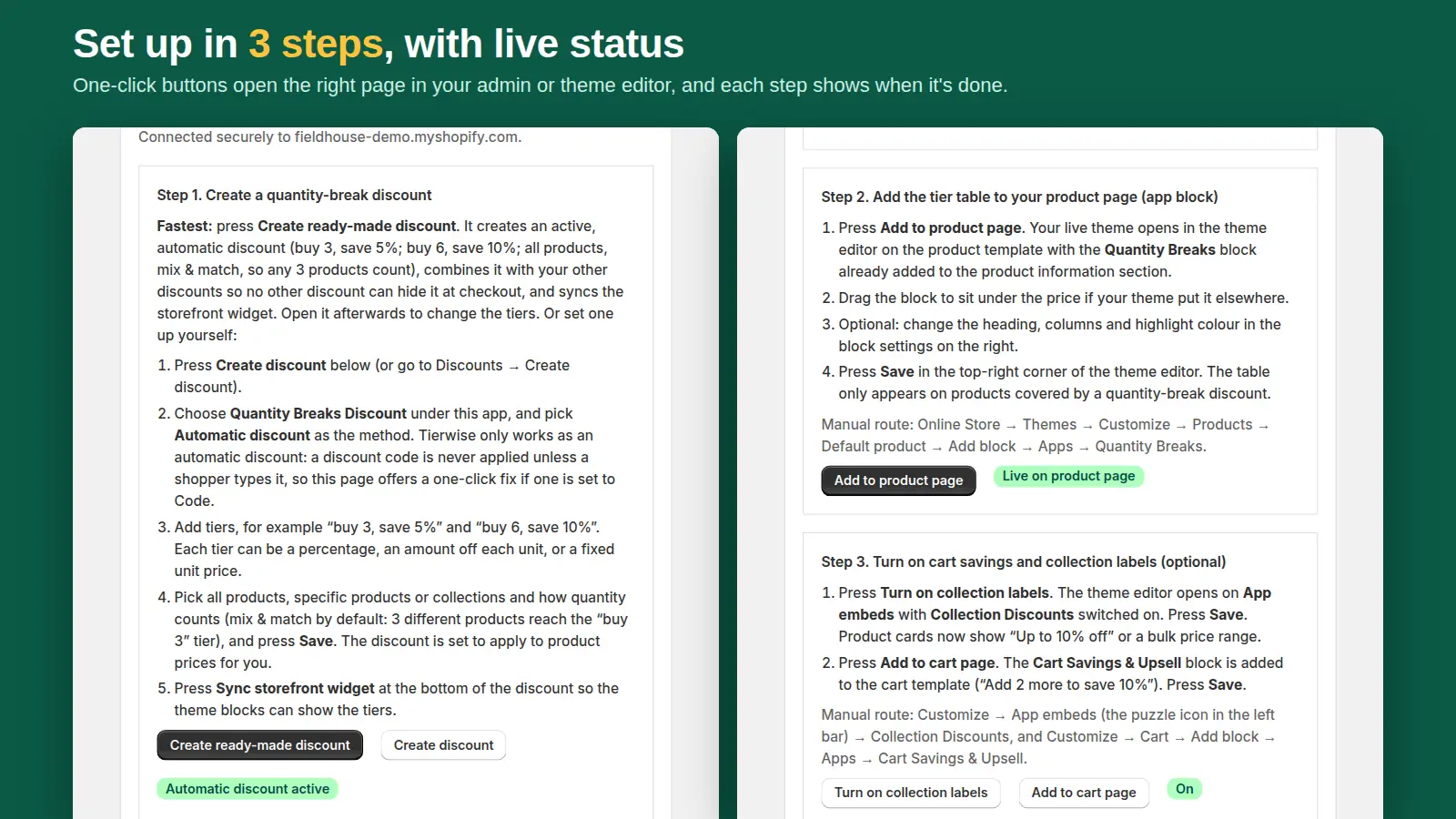
Tierwise was built around these failure points. The app home checks that your quantity-break discount is active and automatic and offers a one-click fix if one is set to a code. Its ready-made discount combines with your other discounts so a sale can't hide it. It runs as a Shopify Function, so it applies at checkout including Buy It Now and express checkout. And the tier table, cart message and collection badges come from the same discount, so what shoppers see matches what checkout charges.
Still stuck with Tierwise? Email support@dixonappstudio.com with your store address and a product link and we'll check the setup. Related: setting up quantity breaks and quantity discounts without Plus.
Frequently asked questions
Why is my Shopify automatic discount not applying?
Usually another automatic discount applies to the same items and the two can't combine, so Shopify picks the better one. Check Combinations on both. Also check the status is Active and the product is covered.
Do Shopify discounts work with Buy It Now?
Automatic discounts and app discounts built on Shopify Functions apply at checkout, including Buy It Now and express checkout. Apps that change prices with draft orders or cart scripts may not.
Why don't my quantity tiers show on the product page?
Shopify doesn't display discount tiers on product pages. Add a table to the description, a metafield-based theme snippet, or an app block.